Starting a YouTube channel is one of the smartest ways to share your ideas, grow your personal brand, or even build a source of income.
I remember when I created my very first channel back in 2018, I had no idea it would eventually lead to real opportunities like collaborating with brands and earning from ads.
The best part is that creating a YouTube channel is absolutely free.
What matters most is consistency, creativity, and understanding how the platform works.
In this blog post, I’ll guide you step by step on how to create a YouTube channel for free, why it’s important, and how you can eventually monetize it.
I’ll also share real-world examples, a comparison table of monetization methods, and practical insights you can apply today.
Why Having a YouTube Channel is Important
YouTube is more than just an entertainment platform — it’s the second largest search engine after Google, with over 2.7 billion monthly users (Statista, 2024). Having a YouTube channel allows you to:
- Build a global audience without huge investment.
- Showcase your expertise or brand.
- Create a potential source of passive income.
- Drive traffic to your website or business.
For example, many small businesses in Zimbabwe and across the world use YouTube to market their services, explain products, and connect directly with customers.
Also check: things to do to skyrocket your YouTube channel
Step-by-Step Guide to Creating a YouTube Channel for Free
Creating a YouTube channel requires only a Google account. Here’s how you can do it:
Step 1: Sign in to YouTube
-
- Go to YouTube.com and sign in with your Google account.
- If you don’t have one, create a new Gmail account first.
- If you’re using the app, follow the screenshots below.
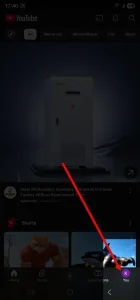
Step 2: Create Your Channel
- Click on your profile picture in the top right corner.
- Select “Create a channel”.
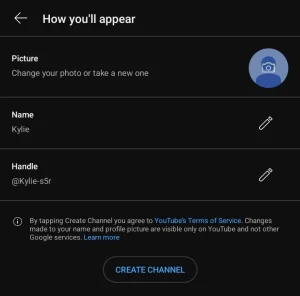
- Choose whether you want a personal channel (your name) or a brand channel (custom name).
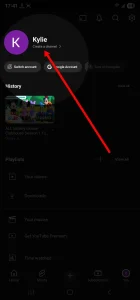
Step 3: Customize Your Channel
- Add a profile photo and banner image.
- Write a channel description that clearly tells viewers what your channel is about.
- Add social links and website links.
Step 4: Upload Your First Video
- Click on the camera icon (top right) > “Upload video”.
- Add a title, description, and relevant tags.
- Make a custom thumbnail for better click-through rates.
What You Need to Monetize a YouTube Channel
YouTube doesn’t pay you just for uploading videos — you need to meet their eligibility requirements for monetization. According to Google’s YouTube Partner Program (YPP), you’ll need:
- At least 1,000 subscribers.
- At least 4,000 watch hours in the past 12 months (or 10 million Shorts views in 90 days).
- A linked AdSense account to receive payments.
- To follow all YouTube monetization policies.
How to Make Money on YouTube
Once your channel is monetized, there are several ways to earn:
- Ad Revenue: Earn money from ads displayed before or during your videos.
- Channel Memberships: Viewers pay monthly to access exclusive perks.
- Super Chat & Super Stickers: Viewers pay during live streams to highlight their messages.
- Affiliate Marketing: Promote products and earn commissions.
- Sponsorships: Brands pay you to feature their products in your videos.
Real-World Examples of Successful YouTube Channels
- Mikateko Mkhari (South Africa) – Started a tech review channel with just her smartphone. Today she earns from AdSense and sponsors while growing her audience across Africa.
- Marques Brownlee (USA) – Began in his bedroom reviewing tech products. Now has over 18M subscribers and earns from ads, sponsorships, and product collaborations.
- Zimbabwean Music Channels – Many local music promoters upload videos and earn significant revenue from views across Africa and the diaspora, showing that even regional content can scale globally.
Comparison Table: YouTube Monetization Methods
| Monetization Method | Requirements | Potential Earnings | Best For |
|---|---|---|---|
| Ad Revenue | YPP approval, consistent views | Moderate | All creators with steady traffic |
| Memberships | 30k+ subscribers recommended | High | Loyal fanbase & community-driven |
| Super Chat/ Stickers | Live streaming audience | Varies | Streamers & live event creators |
| Affiliate Marketing | No requirements from YouTube | High (commission-based) | Niche product reviewers |
| Sponsorships | Strong brand + engaged audience | Very High | Established creators with reach |
Common Mistakes to Avoid
- Buying subscribers or views – This violates YouTube policies and can get your channel banned.
- Using copyrighted music or videos – Always use royalty-free music and original content.
- Inconsistent uploads – Success on YouTube requires regular posting.
Also don’t forget to check more latest tips from Try2Care.
Final Thoughts
Creating a YouTube channel for free is one of the most accessible ways to share your passion, connect with a global audience, and even earn income. From my own experience, the hardest part isn’t setting up the channel — it’s staying consistent and producing valuable content that people actually want to watch.
If you put in the effort, YouTube can open doors you never imagined. Whether you want to build a personal brand, grow your business, or earn extra income, the platform gives you the tools to start without spending a single dollar.
👉 What about you? Are you planning to start your YouTube channel soon, or do you already have one? Share your thoughts and experiences in the comments below — I’d love to hear from you!