

I’ve been writing about digital security for years, but nothing hits home quite like a personal story.
I recently found out my friend Alex, had a devastating lapse in his digital privacy. His chats were not private, not because of a complicated cyberattack, but because of a simple, forgotten connection.
Alex was in a relationship where his girlfriend often borrowed his phone. What he didn’t realize was that in less than two minutes, she had scanned his QR code using the official WhatsApp Web website on her laptop.
She could then read all of his WhatsApp messages, and even reply to them, long after she returned his phone. She essentially had continuous, unlawful access to his private life.
When he finally figured it out, the solution seemed obvious, but he ended up paying a tech guy $50 just to “remove the hack.”
That’s why I’m writing this: to give you the knowledge to secure your conversations and prevent this common form of WhatsApp hacking for free.
The Two-Minute WhatsApp Hack: Understanding the Threat
The biggest threat to your WhatsApp privacy isn’t some shady overseas hacker; it’s often someone you know—a friend, a lover, or a nosy colleague—who has momentary physical access to your phone.
WhatsApp’s “Linked Devices” feature, which powers both the WhatsApp Web client and the WhatsApp desktop app, is incredibly convenient. But it’s also the gateway to this particular type of unlawful access.
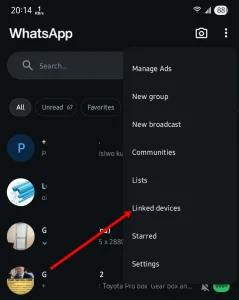
Once someone scans the QR code from their browser (or the desktop application) with your phone, that session becomes persistent.
Your phone doesn’t even need to be near the linked device for the session to stay active! This makes it one of the most effective and quiet forms of digital espionage.
Your Ultimate Checklist to Prevent WhatsApp Hacking
Restoring your privacy and gaining control over your WhatsApp chats is straightforward. We need to focus on what I call “digital hygiene.”
Just like taking steps to boost your immune system naturally at home, these proactive checks are vital for your digital well-being.
Here are the key steps for maximizing your WhatsApp security:
1. Audit Your Linked Devices (The Instant Fix)
This is the most critical step. If someone has hijacked your account, they will be listed here.
- Go to Settings: Open WhatsApp on your primary mobile phone.
- Tap ‘Linked Devices’: This will show you every active session tied to your account (e.g., a Chrome browser, a Windows desktop app).
- Log Out Unknown Sessions: If you see any device you don’t recognize—or even devices you forgot about, like an old work computer—tap on it and select ‘Log Out’.
Instantly, that session will be terminated, and the unauthorized user will lose all access to your WhatsApp chats.
2. Enable Two-Step Verification (The Golden Lock)
This is your essential preventative measure against account takeover. If someone tries to take your phone number and register it on a new device, this PIN will stop them cold.
- Go to Settings > Account > Two-Step Verification.
- Create a 6-digit PIN.
- Add an Email Address: This is crucial if you ever forget your PIN.
This feature is so effective that it’s recommended on the official WhatsApp security page. Think of it as your firewall!
3. Use Biometric Screen Lock
To prevent a quick QR-code scan by someone who briefly grabs your unlocked phone, enable the built-in app lock.
- Go to Settings > Privacy > Screen Lock.
- Enable Fingerprint Lock (Android) or Face ID/Touch ID (iOS).
Even if your phone is unlocked, they won’t be able to open WhatsApp without your biometric confirmation, giving you control over who sees your private conversations.
The Power of the Check
The impact of this simple WhatsApp security check is immense. Consider Sarah, a high-level executive. She had linked her device to a temporary laptop during a business trip and forgot to log out.
For three months, that session remained active in the public office, exposing sensitive company discussions—all because the WhatsApp Web session defaulted to Keep Me Signed In.
After a routine internal security audit (similar to my friend Alex’s painful experience), she found the unknown session and logged out immediately. The peace of mind and the assurance of her privacy were invaluable.
Regularly checking your linked devices is a small task with massive benefits for protecting your personal and professional digital life.
When we are focused on protecting our health and fitness—looking up tips on, say, fast and proven ways to eliminate cold and flu—we must apply the same dedication to our digital security.
Our digital life is just as vital as our physical health!
Securing Your Digital Future
In a world where we’re constantly building our online presence, whether it’s managing a personal brand or learning how to create a YouTube Channel for FREE, protecting your communications is paramount.
Remember that WhatsApp is built with security in mind, utilizing end-to-end encryption—a feature you can read more about in WhatsApp’s dedication to end-to-end encryption.
However, even the strongest lock can be defeated if the key (your unlocked phone) is handed over. The WhatsApp Web and desktop apps are powerful tools, but they require vigilance.
Key Takeaways to Prevent Unlawful Access:
- Linked Devices are the Leak: The most common form of “hacking” is a persistent, unauthorized Linked Device session.
- Act Fast: If you loan your phone, check your Linked Devices immediately afterward.
- Use 2FA: Two-Step Verification is your best long-term account protection.
Now that you know the simple, free fix, I encourage you to check your settings right now. Have you ever experienced a scare with unauthorized access or forgotten linked devices?
Share your WhatsApp hacking experiences and tips in the comments below!
If you need a complete visual walkthrough on removing these sessions, this video shows you exactly how to disconnect those linked devices. Log Out WhatsApp On All Devices




Thank you so much. this is profound, it helped me, thank you